As the demand for home security solutions grows, solar security cameras have emerged as a smart choice. Reports indicate that the home security camera market is projected to reach $10.4 billion by 2025, highlighting significant interest in effective surveillance technologies. One industry expert, Dr. Jane Holloway, emphasizes, “Choosing the right setup is crucial for maximizing the benefits of your solar security camera.”
However, many homeowners struggle with the practical aspects of installation. Understanding how to set up solar security cameras effectively can make a significant difference. Common problems include weak connectivity and improper placement. Data shows that about 30% of users face issues with camera coverage, which can diminish security efficacy.
A reliable setup balances technical expertise with user-friendly solutions. Observing the environment closely and determining optimal locations can enhance functionality. Thoughtfully executed installation not only secures a property but also provides peace of mind. With careful planning, anyone can master how to set up solar security cameras for maximum protection.
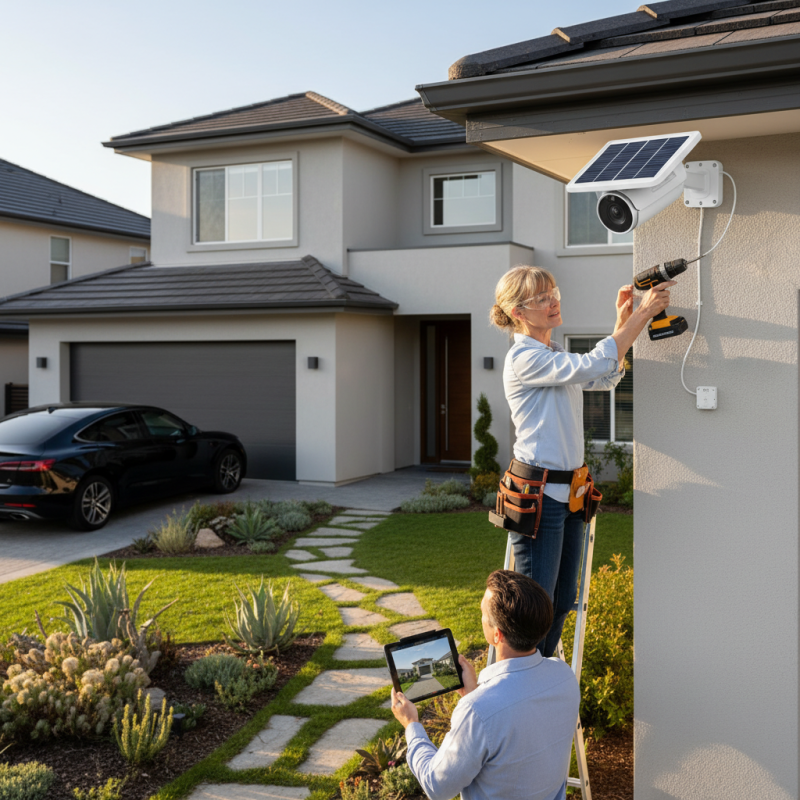
Choosing the right location for your solar security camera is vital. The placement impacts the camera's effectiveness. Aim for areas with maximum sunlight to ensure the solar panel charges efficiently. Ideally, position the camera in a spot receiving direct sun for most of the day.
Consider covering entry points like doors and driveways. High vantage points work best for a wider view. Avoid locations obstructed by trees or buildings. These can block both the sunlight and the camera's line of sight. Sometimes, a perfect spot may not be easily visible. This can lead to challenges during installation.
Testing the camera's field of view is crucial. Before finalizing the position, check how well it captures the surrounding area. This may take some trial and error. It's essential to set it up in a visually appealing way, without compromising security. Proper placement can enhance both safety and aesthetics.
| Tip Number | Tip Description | Key Consideration |
|---|---|---|
| 1 | Install the camera where it has a clear view of the area. | Check for obstacles that may block the view. |
| 2 | Mount the camera high enough to avoid tampering. | Ensure it's still within the field of view. |
| 3 | Choose locations with plenty of sunlight. | Avoid shaded areas which may reduce solar panel efficiency. |
| 4 | Consider the angle for optimal coverage. | Adjust according to the most vulnerable entry points. |
| 5 | Use a secure mounting method. | Ensure it can withstand weather conditions. |
| 6 | Avoid installing near trees or bushes. | Prevent leaves and branches from obstructing the camera. |
| 7 | Check Wi-Fi signal strength at the installation point. | Weak signals can affect camera performance. |
| 8 | Try different locations during daylight. | Evaluate effectiveness and cover before finalizing. |
| 9 | Think about the aesthetic aspect. | Choose a location that doesn’t detract from property appeal. |
| 10 | Consider compatibility with accessories. | Ensure additional devices can connect easily. |
: Look for at least 1080p resolution for clear image capture. This enhances monitoring capabilities significantly.
Battery capacity influences how long the camera operates. Higher-capacity lithium batteries provide longer use in various conditions.
Good Wi-Fi enhances camera functionality. Around 70% of users prefer high-quality connections for better live streaming.
Cold weather may reduce battery performance. Choose cameras that work well in a wide temperature range.
Place the solar panel in direct sunlight. Avoid shaded areas for optimal power generation throughout the day.
Regularly clean the solar panel and check battery health. Dust can block sunlight, hindering charging efficiency.
Check camera positioning and clear any obstructions. This step is vital for effective monitoring.
Keeping firmware up to date is crucial. Updates provide security features and fix bugs, preventing vulnerabilities.
Familiarizing yourself with activity patterns helps identify suspicious behavior quickly. This knowledge can increase security.
Some mounts may not suit all locations. Users often need creative solutions to achieve optimal placement for their cameras.
Setting up a solar security camera can significantly enhance your home security while minimizing energy costs. To effectively learn how to set up a solar security camera, start by choosing the right location that maximizes visibility and minimizes obstructions. Selecting compatible models tailored to your specific needs is also crucial. Once you have your camera, install the solar panel in a position that receives optimal sun exposure to ensure continuous operation.
Next, connect the camera to your Wi-Fi network, enabling remote access and monitoring. Finally, regular testing and maintenance of your solar security camera system are essential to ensure its reliability and effectiveness. By following these steps, you can successfully set up a solar security camera that provides peace of mind while being environmentally friendly.

 Psennikow